How to compress a video for Discord
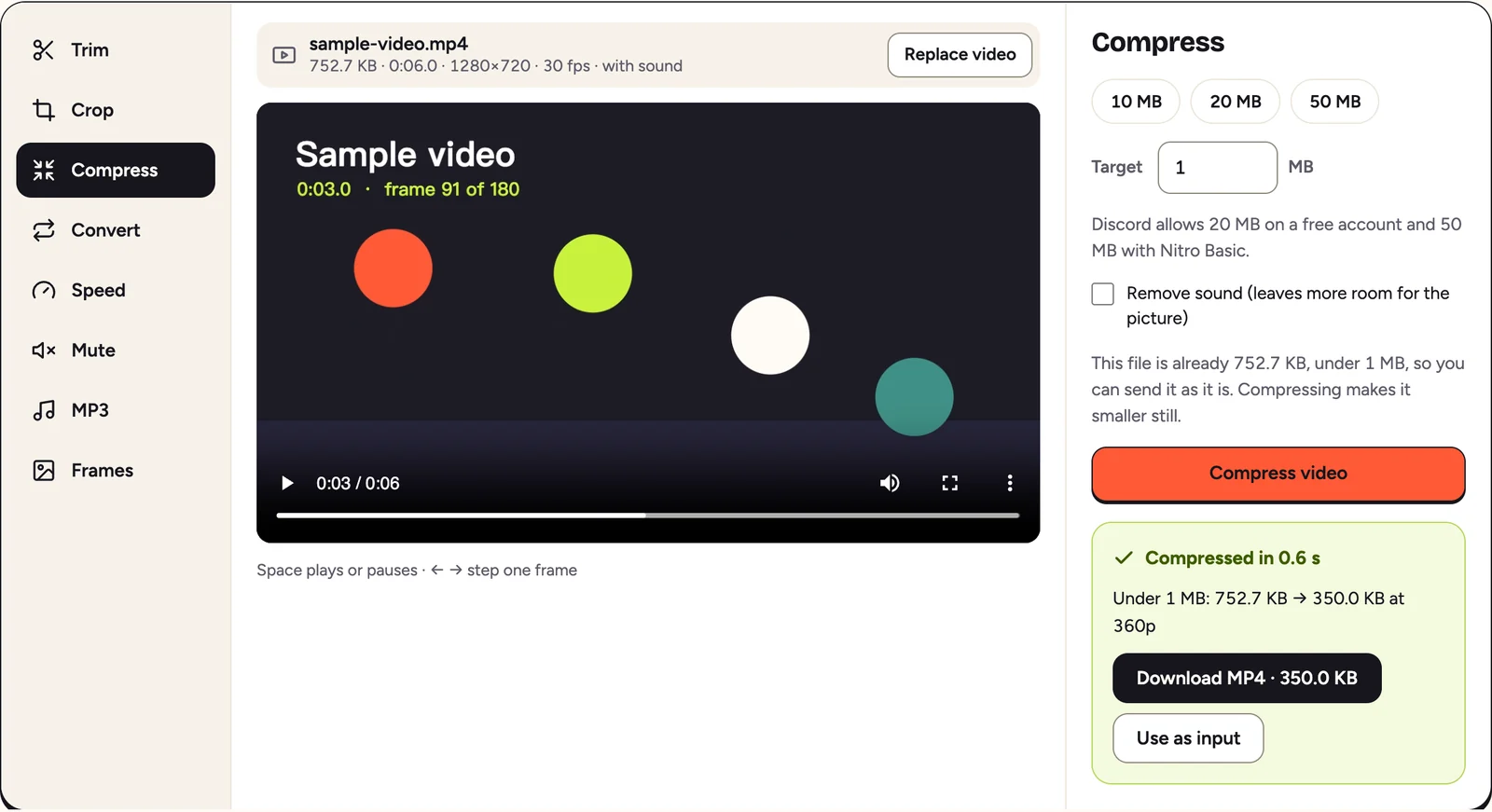
- Choose your video. Drop an MP4, MOV, WebM or MKV file into the box above, or click it to pick one. The file opens in your browser; nothing is uploaded.
- Pick the size limit. 20 MB is the limit for a free Discord account, 50 MB for Nitro Basic. Use 10 MB if you share in places that still use the old limit, or type any custom size.
- Check the plan line. Before you start, the tool tells you the resolution and bitrate it will use. If the clip is too long for the size, it tells you how short to trim it.
- Click "Compress video" and download. The result is an MP4 file named after your original, ready to drag into a Discord chat.
Discord upload limits
| Account | Largest file you can send |
|---|---|
| Free | 20 MB (10 MB before August 2026) |
| Nitro Basic | 50 MB |
| Nitro | Much larger; check Discord's plan page |
The free limit was raised from 10 MB to 20 MB on 13 August 2026, as reported by Dexerto. Guides that still say 10 MB are out of date.
How a size target turns into quality
A video's file size is its bitrate multiplied by its length. So the tool starts from the size you want, divides by the length of your clip, sets a little aside for the sound and the container, and gives the rest to the picture. A lower bitrate looks better at a lower resolution, so the tool also picks a resolution to match. It never asks for a higher bitrate than your original file already has.
| Clip length | 10 MB target | 20 MB target | 50 MB target |
|---|---|---|---|
| 15 seconds | 1080p | 1080p | 1080p |
| 30 seconds | 720p | 1080p | 1080p |
| 1 minute | 480p | 720p | 1080p |
| 2 minutes | 360p | 480p | 720p |
| 3 minutes | 240p | 360p | 480p |
| 5 minutes | too long | 240p | 480p |
| 10 minutes | too long | 240p | 360p |
These are the resolutions this tool chooses for a 1080p source with sound. A smaller source stays at its own size. Removing the sound gives about 96 kbps more to the picture.
Tips for the best-looking result
- Trim before you compress. Every second you remove leaves more bits for the seconds you keep. Switch to Trim in the tool, then press "Use as input" and come back to Compress.
- Remove the sound if it does not matter. Gameplay clips with music or background noise often do not need it. Tick "Remove sound" or use Mute video.
- Crop away empty space. A vertical phone video inside a wide frame wastes bits on black bars. Crop video first.
- Fast motion needs more bits. Games, sports and shaky phone footage look blockier than a talking head at the same size.
Why your video stays private
The compression runs with your browser's built-in video encoder (WebCodecs). Your clip is read from your disk, compressed in memory and handed back to you as a download. There is no server copy to delete, because there never was one.
Discord video compression questions
What is Discord's file size limit?
Free accounts can upload files up to 20 MB. Discord raised this from 10 MB in August 2026. Nitro Basic allows 50 MB per file and full Nitro allows much larger files. Check Discord's own plan page if you are not sure which limit applies to you.
Why does the tool aim a little under the limit?
It targets about 94% of the size you pick, because the encoder cannot hit an exact number. If the first result still comes out over the limit, it runs a second, slightly smaller pass automatically.
My video is 10 minutes long. Will it fit in 20 MB?
Only at a very low resolution. 20 MB spread over 10 minutes leaves about 160 kbps for the picture, which the tool encodes at 240p. For long videos, trim the part you want to share first, or choose a bigger target.
Will the compressed video play inside Discord?
Yes. The tool writes an MP4 with H.264 video and AAC sound, which Discord plays inline on desktop and mobile. If your browser cannot encode H.264, it falls back to a WebM file, which Discord also plays.
Is my clip uploaded to compress it?
No. The compression runs in your browser. Your clip only leaves your device when you upload the finished file to Discord yourself.
Can I compress a video on my phone?
Yes, in a recent Chrome on Android or Safari 26 or later on iPhone. Phones are slower than computers and have less memory, so keep clips short.