How to extract a frame from a video
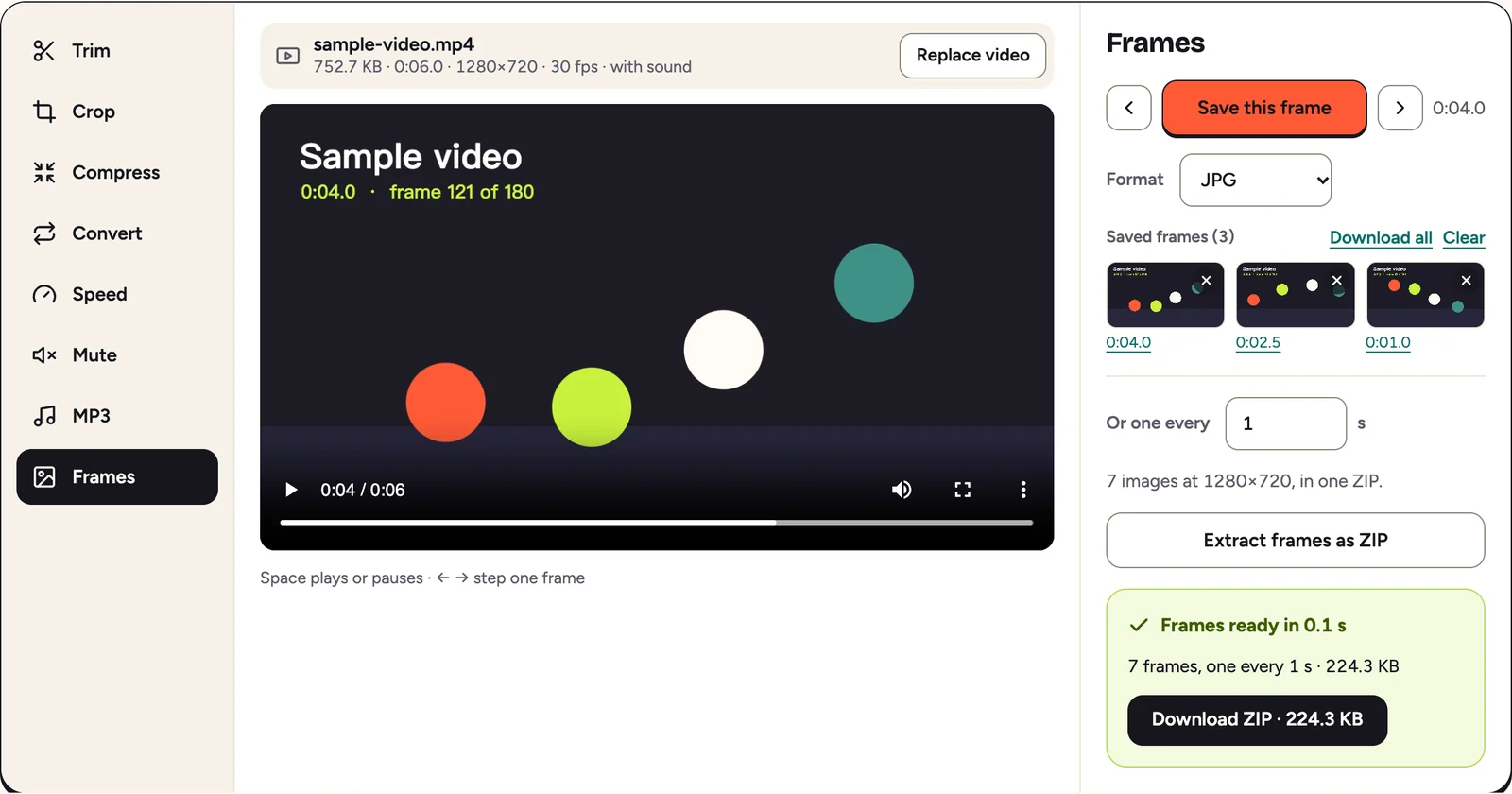
- Choose your video. Drop it in the box above or click to pick it. It opens in the player.
- Find the moment. Play or drag the player to roughly the right spot, then pause. The time next to the buttons shows where you are.
- Step frame by frame. Use the arrow buttons on either side of "Save this frame", or the left and right arrow keys, to land on the exact frame, for example the moment someone's eyes are open.
- Click "Save this frame". The image appears in the panel under the buttons. Click its time to download it, or press "Download all" to get every saved frame in one ZIP. Frames are named with the time they came from.
Extract many frames at once
To get frames at regular intervals, type a number into "Or one every … s" and click "Extract frames as ZIP". The tool decodes the video, saves one image at each interval and packs them into a single ZIP file.
| Interval | Images from a 1-minute video | Good for |
|---|---|---|
| 0.5 s | 120 | Picking the best moment of a fast action |
| 1 s | 60 | Storyboards, training data samples |
| 5 s | 12 | Contact sheets and quick overviews |
| 10 s | 6 | Chapter thumbnails for long recordings |
Files inside the ZIP are numbered in order and include the time, such as clip-0007-0-03_0.jpg. One ZIP holds up to 300 images.
PNG, JPG or WebP?
| Format | Quality | Typical size for one 1080p frame | Use it for |
|---|---|---|---|
| PNG | Lossless | Largest, often several MB | Editing, screenshots with text |
| JPG | Very good | Much smaller | Thumbnails, sharing, slides |
| WebP | Very good | Usually smaller than JPG | Websites and modern apps |
Exact sizes depend on the picture: a busy, detailed frame takes more space than a plain one.
Tips for a sharp frame
- Pick a still moment. Fast motion is blurred in the original video, and no extraction can remove that blur.
- Use the highest-resolution copy of the video you have. A frame cannot be sharper than the video it comes from.
- Slow the clip down first with the video speed changer if the moment is too quick to catch, then step through it here.
Private by design
Frames are decoded and turned into images inside your browser. The video and the images never leave your device unless you choose to share them.
Frame extraction questions
Are the saved frames full resolution?
Yes. A frame from a 1920×1080 video is saved as a 1920×1080 image. It is not a screenshot of the player, so there are no controls or borders in it.
Should I choose PNG, JPG or WebP?
PNG keeps every pixel exactly but makes the biggest files. JPG is much smaller and fine for thumbnails and sharing. WebP is smaller still and works on most websites and modern apps.
How do I get exactly the right frame?
Pause the video near the moment, then use the arrow buttons on either side of Save this frame, or the left and right arrow keys, to step one frame at a time before you save.
How many frames can I extract at once?
Up to 300 images per ZIP. For a long video, choose a longer interval, or trim the part you need first.
Can I use a frame as a YouTube thumbnail?
Yes, if the video is yours. Save the frame as PNG or JPG; YouTube recommends thumbnails of 1280×720, so a frame from a 720p or 1080p video works directly.
Is my video uploaded?
No. Frames are decoded and saved as images inside your browser.