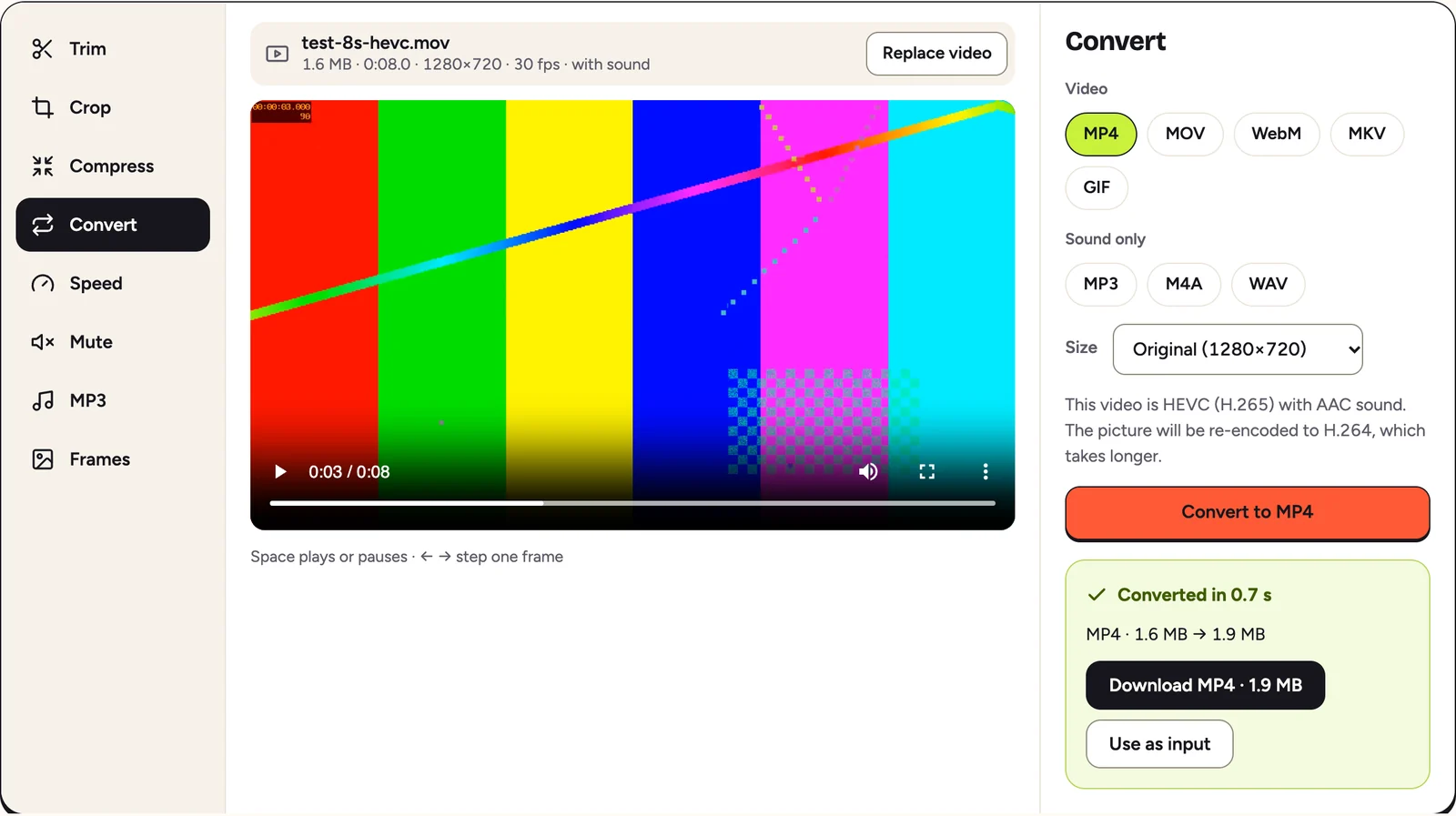
How to convert a video
- Choose the video. Drop it in the box above or click to pick it. The tool tells you what is inside, for example "HEVC (H.265) with AAC sound".
- Pick the target format. MP4 is selected for you. Under Video you can also pick MOV, WebM, MKV or GIF; under Sound only, MP3, M4A or WAV. The line below says whether the picture can be copied (fast and lossless) or has to be re-encoded.
- Pick a size (optional). Keep the original size, or choose 1080p, 720p, 480p or 360p for a smaller file.
- Click "Convert to …" A progress bar shows the work running on your device, with a Cancel link.
- Download the new file. It keeps your file's name with the new extension. To do another job on a video result, press "Use as input".
Which format plays where
| Format | What is inside | Plays in |
|---|---|---|
| MP4 | H.264 + AAC | Almost everything: phones, computers, TVs, browsers, chat apps, editors |
| MOV | H.264 + AAC | Apple apps and editors; most desktop players |
| WebM | VP9 + Opus | Web browsers and web pages; some desktop players |
| MKV | The original streams, copied | Desktop players such as VLC; many editing apps |
| GIF | Images only, no sound | Anywhere that shows images: chats, docs, websites |
| MP3 | Sound only | Every phone, computer and audio app |
| M4A | AAC sound only | iPhones, Macs and most players |
| WAV | Uncompressed sound | Audio and video editing apps |
Copy or re-encode?
A video file is a container (MP4, MOV, MKV, WebM) holding a video stream and a sound stream, each in a codec (H.264, HEVC, VP9, AAC, Opus). When the codec you need is already inside, only the container changes: the streams are copied, the result is identical in quality, and it takes a moment. When the codec has to change, every frame is decoded and encoded again, which takes longer.
| From | To | What happens |
|---|---|---|
| MOV with H.264 (many cameras, screen recorders) | MP4 | Copied, lossless, very fast |
| MOV with HEVC (many iPhones) | MP4 | Re-encoded to H.264 |
| Any supported video | MKV | Copied, lossless, very fast |
| WebM with VP9 | MP4 | Re-encoded to H.264 |
| Any video | 720p MP4 | Re-encoded at the smaller size |
In our tests on 29 November 2026 (Chrome on a Mac laptop), an 8-second 1280×720 HEVC MOV became an H.264 MP4 in 0.7 seconds, and a 6-second 720p clip became MKV, WebM, MOV, M4A, WAV, MP3 and GIF files that we opened again to check their tracks.
Files this tool cannot open yet
Browsers can only decode some video codecs. H.264, VP8, VP9 and AV1 work in current browsers, and HEVC works where the browser and device support it. AVI, WMV and FLV files usually contain older codecs, and ProRes is a professional editing codec; browsers cannot decode them, so this tool cannot convert them. The tool checks the file when you choose it and tells you before it starts.
Private by design
The conversion happens inside your browser. Your video is not uploaded, there is no account and no watermark is added.
Video conversion questions
Which format should I convert to?
MP4 with H.264 video and AAC sound, unless you have a reason not to. It plays on almost every phone, computer, TV, browser and editing app. Pick WebM for a web page that asks for it, MOV if an Apple app prefers it, and MKV to keep the original streams in one flexible file.
Why won't my iPhone video play on Windows or Android?
iPhones often record in HEVC (H.265). Some computers, browsers and apps cannot play HEVC. Converting to MP4 re-encodes the picture as H.264, which they can play.
Does converting lose quality?
When only the container changes, for example an H.264 MOV to MP4, or any video to MKV, the picture is copied and nothing is lost. When the codec changes, for example HEVC to H.264, the picture is re-encoded at a bitrate close to the original, so the difference is hard to see.
Can I convert a video to GIF?
Yes. Pick GIF, choose 320, 480 or 640 pixels wide and 10 or 15 frames per second. GIFs have no sound and get large quickly, so the tool takes clips up to 60 seconds; trim longer videos first.
Can I keep only the sound?
Yes. Pick MP3 for a file that plays everywhere, M4A (AAC) for iPhones and Macs, or WAV for uncompressed sound to use in an editing app. For a choice of MP3 bitrates, use the video to MP3 tool.
Can it make the video smaller?
Pick a lower size such as 720p or 480p, which re-encodes the picture at that height. To hit an exact file size, such as 20 MB for Discord, use the compressor instead.
Can it convert AVI, WMV or FLV?
Not yet. Browsers cannot decode the video formats inside most AVI, WMV and FLV files, and this tool only uses what your browser can decode. It tells you straight away if a file cannot be read.
Is my video uploaded?
No. The conversion runs in your browser using its built-in video encoder, and the result is saved straight to your device.