How to crop a video
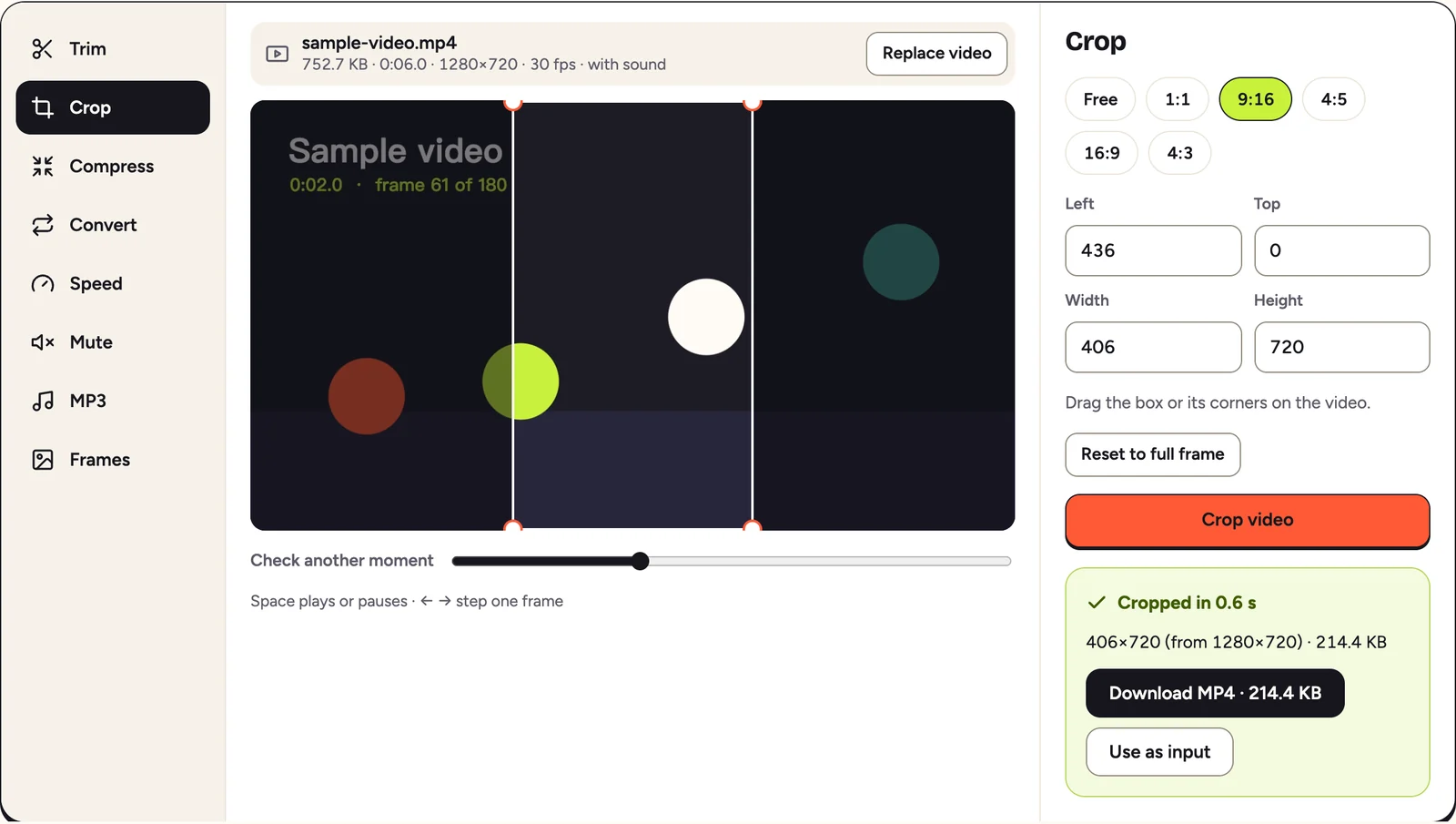
- Choose your video. Drop it into the box above or click to pick it. The first frame appears with a crop box over it.
- Pick a shape (optional). Free lets you draw any rectangle. 1:1, 9:16, 4:5, 16:9 and 4:3 lock the box to that shape.
- Place the box. Drag the middle of the box to move it and the round corner handles to resize it. Use the "Check another moment" slider under the video to look at other moments, so nothing important falls outside the box later in the video.
- Fine-tune in pixels (optional). Type exact values for left, top, width and height.
- Click "Crop video" and download. The new file is named after the original with -cropped at the end.
Crop sizes for social media
| Shape | Common use | Crop from 1920×1080 | Crop from 1080×1920 |
|---|---|---|---|
| 9:16 vertical | TikTok, Reels, Shorts, Stories | 608×1080 | 1080×1920 (no crop needed) |
| 1:1 square | Feed posts, profile videos | 1080×1080 | 1080×1080 |
| 4:5 portrait | Instagram and Facebook feed | 864×1080 | 1080×1350 |
| 16:9 wide | YouTube, presentations | 1920×1080 (no crop needed) | 1080×608 |
| 4:3 | Older screens, some slides | 1440×1080 | 1080×810 |
The tool keeps the largest box of that shape that fits your video, centred on where your box was, and rounds sizes to even numbers.
When to crop a video
- Turn a landscape clip into a vertical one for short-video apps, without black bars above and below.
- Remove black bars that were burned into the picture, for example a phone video recorded inside a wide frame.
- Hide something at the edge of the frame, such as a desktop taskbar in a screen recording or a person who walked into the shot.
- Make a file smaller. A smaller picture needs fewer bits, which helps when you compress a video for Discord.
What happens to quality
Cropping changes the size of every frame, so the picture is encoded again. The tool gives the cropped area about the same share of bitrate it had in the original, so the crop looks like the original. Only the part inside the box is kept; it is not stretched or upscaled. The sound is copied as it is.
Private by design
The cropping runs in your browser using its built-in video encoder. Your video is not uploaded, so there is no waiting for an upload and no copy left on anyone's server.
Video cropping questions
Is this video cropper free?
Yes. It is free, needs no account and adds no watermark to the cropped video.
What is the difference between cropping and resizing?
Cropping cuts away the edges of the picture and keeps the middle at its original sharpness. Resizing scales the whole picture up or down. This tool crops; the kept area keeps its original pixel size.
How do I make a video vertical for TikTok, Reels or Shorts?
Pick 9:16 vertical, drag the box over the part of the frame you want, and crop. From a 1920×1080 video, a 9:16 crop is 608×1080 pixels.
Why are my crop numbers rounded?
Video encoders need even widths and heights, so the tool rounds the box to even numbers of pixels when it crops.
Does cropping keep the sound?
Yes. The sound track is copied into the cropped video unchanged.
Does cropping reduce quality?
The picture has to be encoded again, because the frame size changes. The tool gives the cropped area about the same share of bitrate it had in the original, so the difference is hard to see. The cropped area is never upscaled.